NO MORE CALORIE GUESSWORK
CalCal
Akhmad Aji Permadi
As a Researcher & iOS Developer
Scroll to explore ↓
CalCal
Akhmad Aji Permadi
As a Researcher & iOS Developer
Scroll to explore ↓
DIVE INTO THE PROBLEM
Managing body weight (whether losing, gaining, or maintaining) remains a challenge for many people. While information about calories and health metrics is widely available, knowing the theory alone rarely translates into action.
Through early research, I found that the difficulty wasn’t simply about diet or exercise, but about understanding how much the body actually needs. Key health metrics such as BMI (Body Mass Index), BMR (Basal Metabolic Rate), and TDEE (Total Daily Energy Expenditure) are widely referenced, yet applying them correctly requires knowledge of formulas, manual calculations, and proper interpretation.
This complexity often becomes a barrier before users even begin.
As a researcher, I focused on identifying where users struggle most. By analyzing user behavior and existing tools, I discovered that while people are aware of concepts like calorie intake, they often lack confidence in calculating and using them accurately.
This led to a central design question:
How might we simplify body classification and calorie calculations so users can focus on their health goals instead of complex formulas?
Through research, I validated that:
DESIGNING THE SOLUTION
Users often know what their body should do, but translating that knowledge into action is frustrating. I reframed the challenge around a single guiding idea:
How can we let users understand their body’s needs instantly, without juggling formulas or calculations?
Research and early testing revealed a clear pattern: even when users understood BMI, BMR, and TDEE, the mental effort required to compute and interpret these numbers created a barrier. The concepts themselves were familiar, but applying them correctly felt overwhelming.
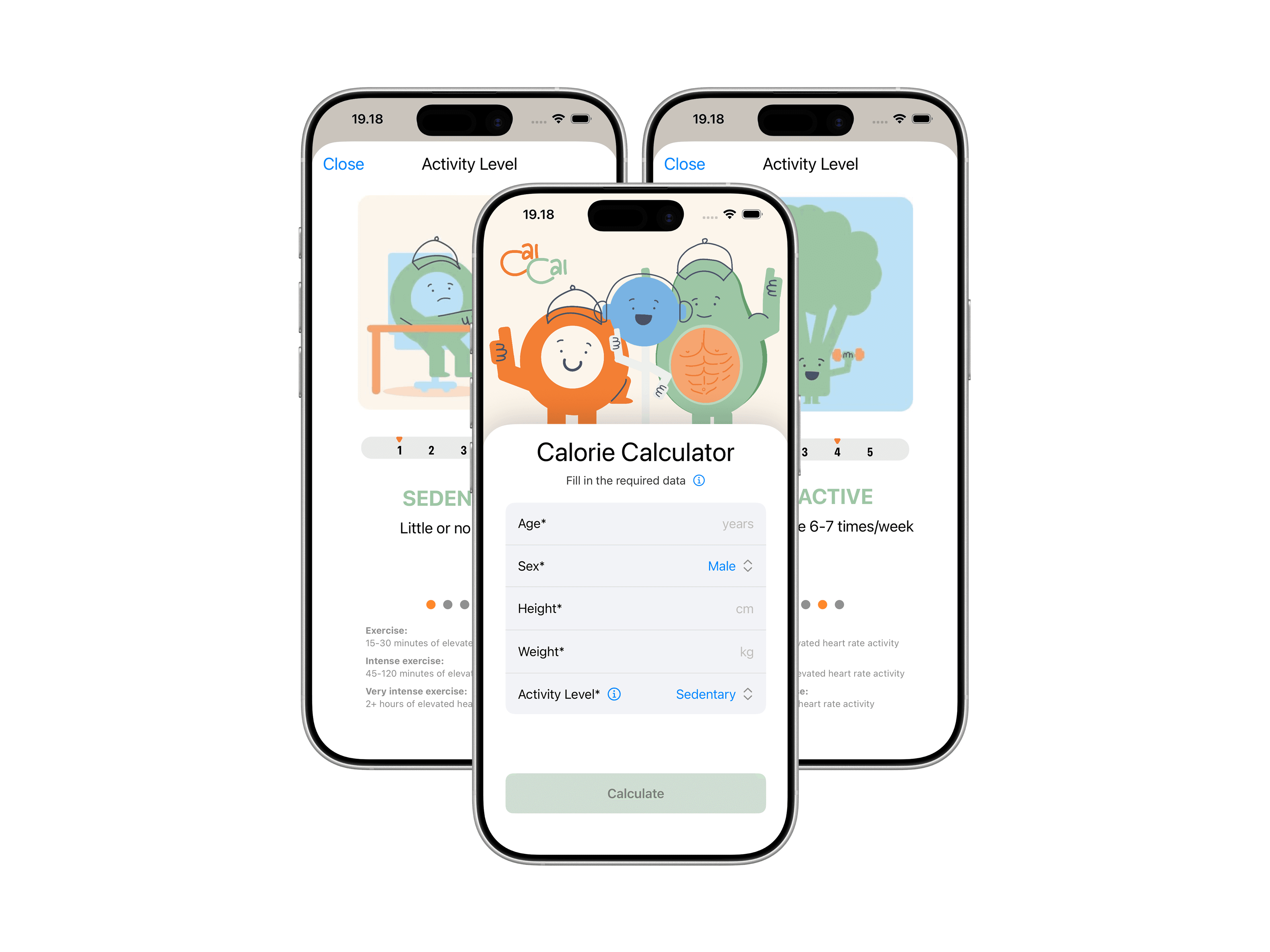
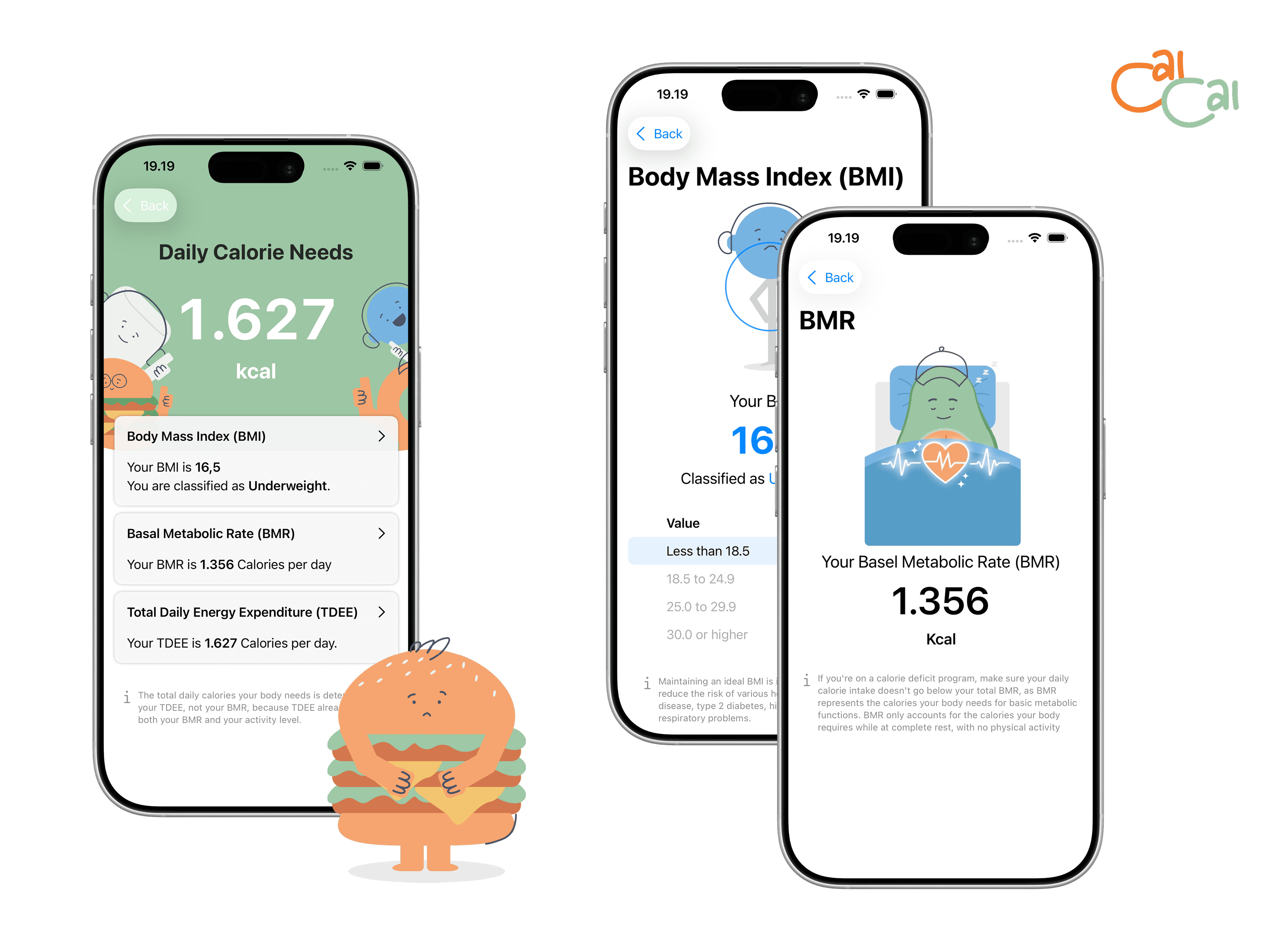
With this in mind, I designed CalCal to transform data into clarity. Users simply provide essential personal information, and the app computes their BMI, BMR, and TDEE automatically, presenting results in a straightforward and actionable way. This allows users to focus on setting goals and making choices, instead of wrestling with numbers.
By translating complex health metrics into clear insights, CalCal turns uncertainty into confidence. Users can now make informed decisions about their diet and exercise effortlessly, empowering them to take control of their health without friction.
DESIGN AND DEVELOPMENT APPROACH
Throughout the project, I collaborated closely with my team while applying Challenge-Based Learning (CBL) to guide both the research process and technical execution. This approach helped ensure that each design and development decision was grounded in a real user problem rather than assumptions.
Apple’s Human Interface Guidelines (HIG) played a key role in shaping the final experience. I paid close attention to information hierarchy, visual clarity, and accessibility considerations such as color contrast and readability. The goal was to make the app feel intuitive and approachable, even for users encountering these health concepts for the first time.
As an iOS developer, I focused on implementing features in a clear and organized way. I structured the app so that each part of the code handled a specific task, making it easier for me to understand, debug, and iterate on as the project progressed. This approach helped ensure the app remained reliable and user-friendly, even as I added new functionality.
RESULT

We tested CalCal with over ten users, who consistently described the app as intuitive and easy to use. The real-time calculations of BMI, BMR, and TDEE, paired with in-app explanations, helped users understand not just the numbers but what they meant for their daily health decisions.
This feedback confirmed that simplifying complex calculations into clear and actionable insights made a tangible difference. Users felt more confident in planning meals and exercise, and the app successfully reduced the cognitive burden that often discourages people from managing their body weight.
CalCal shows how research-driven design and hands-on iOS development can transform complex health data into an intuitive and user-friendly experience.